Brief Introduction
Whether you are a manager selecting equipment for your warehouse or a frontline operator about to use new tools, when you first hear the term "RF scanner," you likely have many questions: What exactly is an RF scanner? How is it different from a regular barcode scanner? More importantly, how do I use it correctly to improve my work efficiency?
For professionals in manufacturing, logistics, retail, and even healthcare, the answers are crucial. Manual inventory recording is not only inefficient and error-prone but also hinders overall operations in today's fast-changing market. RF scanning technology is key to solving this pain point.
This article will simplify the complex and provide you with a comprehensive guide from basics to advanced implementation. We will first clarify the essence of RF scanners, then walk you through how to use them step-by-step, delve into their powerful applications in warehouse environments, and finally recommend SEUIC scanning equipment, which is highly trusted in the industry, to help you take a solid step towards digital transformation.
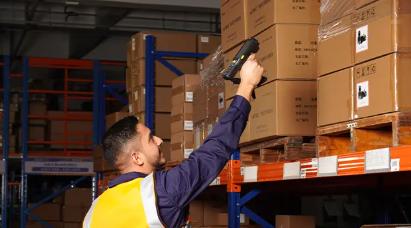
1. Core Revelation: What Exactly is an RF Scanner (RF Gun)?
Simply put, an RF scanner is a wireless handheld data collection terminal. It far surpasses the capability of a simple USB barcode scanner that just "scans and goes."
Let's break down its core components:
"RF" stands for "Radio Frequency": This means the device communicates with backend servers (like your WMS) in real-time, bidirectionally via wireless networks (typically Wi-Fi). Information you scan is instantly uploaded, and instructions from the server are immediately received.
"Scanner": It integrates a high-performance barcode (1D/2D) scanning engine, capable of reading various barcode labels quickly and accurately.
"Terminal": It is essentially a rugged miniature computer, typically with its own operating system (like Android), processor, memory, screen, and physical or touch keyboard. This allows it not only to collect data but also to run specific business applications, display complex information, and allow operators to interact.
The key difference between an RF scanner and a regular barcode scanner lies in "real-time" capability and "intelligence." A regular scanner merely inputs barcode data into a connected computer; an RF scanner frees you from cables, allowing you to directly communicate with the central database from anywhere in the warehouse, enabling dynamic location queries, task reception, and feedback.
2. From Startup to Task Completion: A Complete Breakdown of RF Scanner Usage Steps
Understanding what it is, let's move on to the practical steps. Using an RF scanner typically follows this standardized process:
Step 1: Hardware Preparation and Inspection
Check battery level: Ensure the device is sufficiently charged, or place it in the charging dock.
Physical inspection: Check if the scanning window is clean and the device has no obvious physical damage.
Network connection (Wi-Fi): Connect to the designated corporate wireless network in the device settings; this is the foundation of RF functionality. Signal strength is displayed in the status bar.
System login: After powering on, run the warehouse management application and log in using your employee ID and personal password. This ensures traceability of all operations.
Step 2: Familiarize Yourself with Device Operation
Scanning: Aim at the barcode and press the scan trigger or designated button. A successful scan is confirmed by a beep, and the data is automatically entered into the cursor location.
Screen viewing: The screen displays task instructions, product information, quantity, target location, etc.
Data entry: Use the physical keyboard or touch keyboard to enter information that cannot be scanned, like quantities or batch numbers.
Function keys: Devices usually have customizable function keys (e.g., F1-F5) for actions like "Confirm," "Back," "Query," "Complete." Use them according to system prompts.
Step 3: Execute Specific Task Procedures (Using "Putaway" as an example)
Receive Task: After logging in, the system automatically assigns or allows manual selection of a "Putaway" task.
Scan Container/Pallet ID: Scan the barcode on the pallet or tote containing the goods to be put away; the system identifies the item information.
Scan Target Location ID: Go to the empty shelf location assigned by the system or chosen by you, and scan the location barcode on the shelf.
Confirm & Complete: Enter the actual putaway quantity and press the "Confirm" or "Complete" key. The system updates the inventory record in real-time, binding the goods to the location.
Next Task: The system automatically pushes the next task to be processed.
Key Point: The core logic of the entire operation is "scan verification" – comparing the scanned physical barcode with the system instruction to ensure the "right goods" are placed in the "right location" or sent to the "right order."
3. The Core Battlefield for Cost Reduction and Efficiency Improvement: Key Application Scenarios of RF Scanners in Warehouses
The value of RF scanners is fully demonstrated in every aspect of warehouse operations. Here are their most classic application scenarios:
3.1 Receiving and Inbound
Operation: Upon arrival of goods, scan the delivery note number and the barcode of each pallet/case, verifying against the purchase order.
Value: Quickly completes receiving registration, achieves accurate ASN matching, prevents erroneous receipts.
3.2 Putaway and Location Management
Operation: As shown in the steps above, scan the goods and the location barcode; the system can intelligently recommend the optimal putaway location.
Value: achieve granular and dynamic management of storage locations, improve warehouse space utilization, and lay the foundation for subsequent rapid order picking.
3.3 Order Picking
Modes: Supports discrete order picking, batch picking, and wave picking. The screen clearly indicates "where to pick from (location)", "what to pick (item)", and "how much to pick (quantity)".
Value: This is the aspect where efficiency improvement is most significant. Route optimization and error-proof reminders (scanning item barcode for verification) reduce picking error rates to nearly zero.
3.4 Cycle Counting and Inventory Adjustment
Operation: During cycle counts or full physical inventories, employees use the RF scanner to scan locations and items, entering the actual counted quantity. Data syncs in real-time, and the backend immediately generates variance reports.
Value: Fast counting speed, high accuracy, can be performed anytime without affecting daily operations, ensuring 100% book-to-physical accuracy.
3.5 Outbound and Loading Verification
Operation: Before shipment, scan the outbound carton barcode to verify if the order matches the physical goods.
Value: Ensures 100% accuracy of shipped goods, serving as the final and most critical checkpoint for maintaining customer satisfaction.
4. Equipment Recommendation: Why SEUIC RF Scanners are a Reliable Choice for Warehouses?
When you decide to introduce RF scanners, choosing rugged, stable, and efficient equipment is crucial. SEUIC, as a leading provider of automatic identification and data collection solutions, has a high market share and reputation in the warehousing and logistics field.
Here are the core advantages of SEUIC scanners for warehouse environments, along with model references:
- Industrial-Grade Ruggedness: Devices generally meet or exceed IP65 ratings, can withstand multiple drops from height onto concrete, are dustproof and waterproof, fully adapting to harsh warehouse environments.
- Excellent Scanning Performance: Utilizes industry-leading scan engines, providing outstanding read capability for damaged, wrinkled, long-range, and on-screen barcodes, ensuring operational smoothness.
- Long-Lasting Battery Life: Equipped with high-capacity batteries supporting hot-swapping (some models), meeting the demand for all-day high-intensity operation without power interruption, paired with multi-bay charging docks for easy centralized management.
- Ergonomic Design: Lightweight design, comfortable grip, reduces fatigue during prolonged use. Logical physical key layout allows easy operation even with gloves.
- Open Android Platform: Based on the Android system, developing and deploying enterprise applications (e.g., integrating with your WMS) is more flexible and convenient.
Model References for Different Warehouse Needs:
High-Intensity Picking/Counting: Consider the AUTOID series, such as AUTOID 10, well-balanced,} durable, and cost-effective.
Large Screen for Information Processing: If viewing complex drawings or large amounts of SKU information is needed, large-screen models like the AUTOID Q7 are more suitable.
Selection Advice: The best method is to conduct a selection test based on your specific operational workflow, budget, and system compatibility.
Through this article, you have learned that an RF scanner is far more than a simple "scanning tool"; it is a real-time data hub and intelligent operation terminal connecting the physical inventory with the digital world. Mastering its usage and deeply integrating it into your entire process—inbound, storage, picking, counting, outbound—is the necessary path for traditional warehouses moving towards modern, intelligent management. The benefits it brings include not only over 99.9% inventory accuracy and over 30% operational efficiency improvement but also comprehensive enhancements in decision support, process transparency, and customer satisfaction.
- Demystifying Manual Traceability Pains: How CRUISE2 5G Enables Barcode-Based Bidirectional Traceability2026-04-03
- Demystifying Slow Backroom Transfers: How UTouch 2-S Enables Second-Level Inventory Navigation2026-04-03
- Demystifying Quality Control Bottlenecks: How RFID Moves Towards Proactive Prevention2026-04-02
- How Handheld Computers Achieve End-to-End Traceability2026-04-02
- Demystifying Workstation Information Bottlenecks: How CRUISE2 5G Enables Paperless, Real-Time Operations2026-04-01