Brief Introduction
In today's fast-paced industrial world, data collection and real-time information processing are the lifelines of efficiency. However, for quality inspectors busy on the factory floor, pickers shuttling through warehouses, inspection personnel working in wind and rain, or nurses requiring strict disinfection in hospitals, ordinary consumer-grade phones or tablets are too fragile. An accidental drop, pervasive dust, or an unavoidable water splash can lead to data loss, work stoppage, and significant financial losses.
This is the raison d'être of rugged mobile computers. They are not simply "thickened" phones but professional tools tailor-made for harsh industrial and commercial environments. But faced with a dazzling array of products, complex parameters, and industry terminology on the market, how can you make the smartest, most cost-effective choice? This article serves as your authoritative selection guide, taking you step-by-step through deconstructing needs, understanding key specifications, and ultimately finding that reliable digital partner that can withstand challenges with your team.
1. Define Your Core Needs and Environmental Challenges (Needs Analysis)
Before looking at any technical parameters, first answer these fundamental questions. This will delineate a clear scope for your subsequent selection.
1.1 What is the Main Application Scenario?
- Warehouse Logistics: High-frequency scanning (1D/2D barcodes), inventory management, sorting and distribution. Key needs: Excellent scanning engine performance, comfortable design for long-term holding, efficient battery life.
- Factory Workshop/Manufacturing: Production data entry, quality management, equipment inspection. Key needs: Protection against oil, metal debris, possible need for touchscreen operation with thick gloves, and integration capability with MES/ERP systems.
- Retail and Stores: Mobile checkout, inventory counting, customer service. Key needs: Stylish and aesthetically pleasing design, responsive touchscreen, convenient payment functions (e.g., NFC), and receipt printing support.
- Field Service and Utilities: Outdoor meter reading, facility inspection, construction supervision. Key needs: Excellent outdoor screen visibility (high brightness), wide temperature tolerance range, accurate GPS/GNSS module, and long battery life.
- Healthcare: Medication management, patient identification verification, mobile nursing. Key needs: Resistance to frequent disinfectant wiping (specific chemical protection), easy-to-clean housing, quiet design, and devices optimized for medical software.
1.2 What Specific Environmental Threats Will Be Faced?
- Is it continuous dust (e.g., flour mills, building material warehouses) or intermittent water splashes (e.g., beverage factories, outdoor work)?
- Is the device likely to be dropped from carts, shelves, or the waist (typical drop height 1.2-1.8 meters)?
- Are the operating temperature extremes (cold storage, high-temperature workshops, outdoor severe cold or heat)?
- Will it be exposed to oil, chemical solvents, or require frequent disinfection?
2. Interpreting the Core "Hard Metrics" of Rugged Equipment
Understanding the following industry standards is the foundation for making professional choices. These parameters directly define the "ruggedness" of the equipment.
2.1 Dust and Water Protection Rating: IP Code
Dustproof and Waterproof Rating: IP Code
The IP (Ingress Protection) rating is an international standard measuring a device's protection against solid foreign objects and liquid ingress. The format is "IPXY".
- First Digit (Dust Protection): Range 0-6. IP6X indicates "completely dust-tight," a necessity for industrial environments.
- Second Digit (Water Protection): Range 0-9. Common levels include:
- IPX5/IPX6: Protection against low-pressure/high-pressure water jets. Suitable for environments that are frequently rinsed (e.g., food processing).
- IPX7: Can be immersed in 1 meter of water for 30 minutes. Handles accidental submersion.
- IPX8: Can be waterproof to greater depths and longer times specified by the manufacturer. Often combined with IP6X to form the golden combination of IP67 or IP68, meeting the needs of most harsh environments.
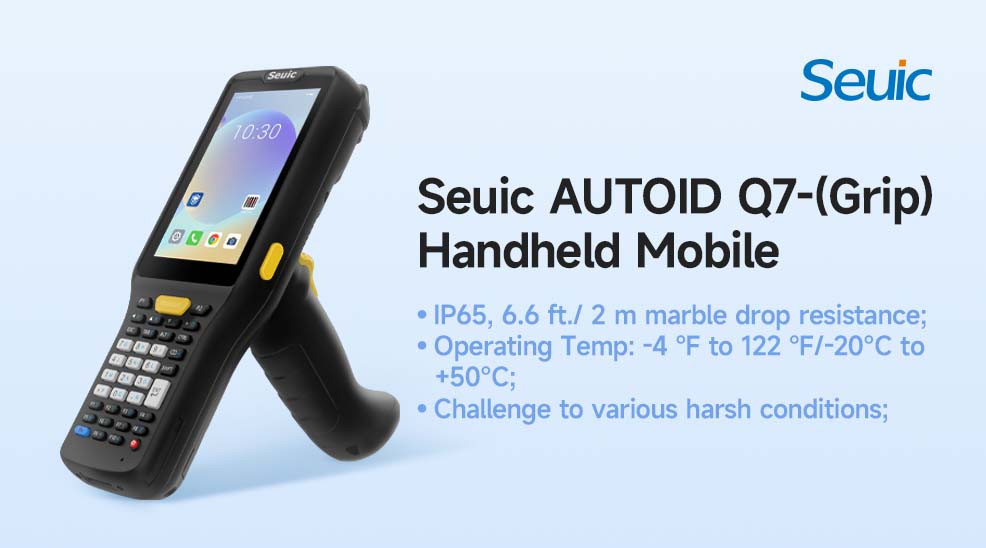
For example, the AUTOID Q7-(Grip) boasts an IP65 protection rating, meaning it is completely dust-tight and protected against low-pressure water jets, making it ideal for challenges like dust and water splashes common in warehousing and logistics environments. This design ensures device reliability under high-pressure washing or dusty conditions, directly demonstrating the protective advantages of industrial-grade equipment.
2.2 Shock and Drop Resistance Standard: MIL-STD-810G/H
This is a US military standard defining the harsh environmental conditions that equipment must withstand during transportation, storage, and use. Focus on drop and shock testing.
- Equipment is often marked with specifics like "passes drop test onto concrete from 1.8 meters (6 feet)". This height should be greater than or equal to the potential drop height in your actual use.
- Note: MIL-STD is a test method standard; manufacturers need to declare the specific test items (e.g., drop, vibration, thermal shock) their product passes.
Taking the AUTOID Q7-(Grip) as an example, its drop specification is from 1.8 meters height onto concrete, and it can even withstand a 2-meter drop onto marble test, having passed over 60 reliability tests in SEUIC's professional CNAS laboratory. This not only aligns with the testing spirit of MIL-STD-810G/H but also proves its industrial-grade durability, suitable for high-frequency drop environments like warehouses or workshops. Note that MIL-STD is a test method standard, and manufacturers need to declare the specific items passed (like drop, vibration, etc.), while the AUTOID Q7-(Grip)'s actual test data provides users with intuitive trust basis.
2.3 Operating Temperature Range
Consumer devices typically operate between 0°C and 35°C. Rugged devices have a much wider range, e.g., -20°C to 50°C or even broader. Ensure the selected device's temperature range covers the extremes of your actual storage and operating environment.
The AUTOID Q7-(Grip), having passed various harsh condition tests, can operate in temperatures from -20°C to 50°C, ensuring the temperature range covers the extremes of your actual storage and operating environment.
3. Key Functions and Performance Selection
Beneath the rugged exterior, the internal configuration determines work efficiency.
3.1 Data Capture Capability (Scanning Engine)
- Imager Scanner vs. Laser Scanner: Imager scanners can read 1D/2D codes and capture document images, and are currently mainstream. Laser scanners still have an advantage in reading damaged 1D barcodes.
- Scanning Performance: Pay attention to scan distance, depth of field, and ability to read barcodes on different materials (e.g., screens, metal etching). Request sample testing from suppliers.
3.2 Screen Visibility and Touch
- Brightness: Recommended above 1000 nits for outdoor use to ensure clarity under direct sunlight.
- Technology: Capacitive screens are sensitive but may not support all gloves. If thick glove operation is required, confirm the device supports "glove mode" or consider a resistive screen (although these are becoming less common).
- Protection: Corning Gorilla Glass or similar toughened glass is standard for scratch resistance.
3.3 Connectivity and Expandability
- Wireless Connectivity: Robust dual-band Wi-Fi (2.4GHz/5GHz) and Bluetooth are fundamental. Cellular network (4G/5G) is crucial for field personnel requiring wide-area mobile connectivity.
- Ports and Expansion: Are USB, serial ports (RS232) needed to connect to legacy equipment? Is a dedicated docking station needed for charging and data synchronization?
3.4 Battery and Manageability
- Battery Life: Rated battery life is based on specific tests. Inquire about typical battery life under actual workload. Does it support hot-swappable batteries? This is a lifesaver for 24/7 continuous operation scenarios.
- Device Management: Enterprise-grade devices should support Mobile Device Management (MDM) solutions like SOTI MobiControl, VMware Workspace ONE, for remote deployment, monitoring, protection, and updating of large device fleets.
4. Ecosystem, Total Cost of Ownership, and Selection Strategy
4.1 Brands and Ecosystem
The market is mainly dominated by professional brands like Zebra Technologies, Honeywell, SEUIC, etc., which offer complete solutions from hardware and software to services.
There are also excellent brands focused on specific fields. Evaluating their local support, warranty policies, repair cycles, and spare parts supply capability is crucial.
4.2 Beyond Purchase Price: Calculating Total Cost of Ownership (TCO)
The real cost is not just the unit price of the device, but also includes: accessories (batteries, docks, straps), software licenses, device management software, repair costs and downtime due to accidental damage, and productivity losses caused by device failure.
A more reliable and faster-to-repair device may have a much lower Total Cost of Ownership (TCO) than an initially cheaper but frequently failing device.
Selecting a rugged mobile computer is essentially about matching the most competent professional tool to the unique work challenges of your team. There is no "best," only "most suitable."
Our recommendation is: Start from your core business scenario and the biggest environmental threats, clarify the protection levels (IP, drop) and functional hard indicators (scanning, screen) that must be met. Then, arrange for actual sample testing whenever possible, allowing end-users to operate in simulated real-world environments. Finally, incorporate service, support, and total cost of ownership into the final decision-making framework.
Investing in professional rugged mobile computers is an investment in operational resilience, employee efficiency, and data continuity. In harsh environments, a reliable digital partner will become a solid guarantee for the uninterrupted operation of your business.
- Demystifying Manual Traceability Pains: How CRUISE2 5G Enables Barcode-Based Bidirectional Traceability2026-04-03
- Demystifying Slow Backroom Transfers: How UTouch 2-S Enables Second-Level Inventory Navigation2026-04-03
- Demystifying Quality Control Bottlenecks: How RFID Moves Towards Proactive Prevention2026-04-02
- How Handheld Computers Achieve End-to-End Traceability2026-04-02
- Demystifying Workstation Information Bottlenecks: How CRUISE2 5G Enables Paperless, Real-Time Operations2026-04-01