Brief Introduction
In modern healthcare environments, from nursing stations to patient bedsides, from pharmacies to mobile diagnostic carts, the instant and accurate acquisition and entry of information are crucial for ensuring patient safety and improving diagnostic and treatment efficiency. Traditional desktop computers or consumer-grade tablets often prove inadequate here - they cannot withstand frequent disinfection wipe-downs, struggle to handle occasional drops or impacts, and fail to maintain stable connections in complex wireless network environments.
Selecting an appropriate medical mobile computer or hospital-grade tablet is far from a simple hardware procurement; it is a strategic decision concerning workflow optimization, data security, and long-term return on investment. Whether you are a hospital IT director, medical equipment procurement specialist, or head of a nursing department, this guide will systematically analyze the special requirements of the healthcare environment and provide a clear, practical selection roadmap.
1. Why Healthcare Environments Have 'Special Requirements' for Mobile Computing Devices
The healthcare environment is a unique and demanding ecosystem. The challenges devices face here are far greater than in a typical office:
High-Frequency, High-Intensity Infection Control Needs: This is the primary and most critical challenge. Device surfaces must withstand dozens of daily wipe-downs with disinfectants containing chlorine, alcohol, or hydrogen peroxide, without causing casing corrosion, fading, screen coating damage, or button failure.
Complex Physical Usage Environment: Devices may be placed on mobile carts moving through corridors, carried by healthcare staff, or potentially dropped from bedside tables in busy situations. Ruggedness is a basic requirement for survival.
Stringent Compliance and Safety Standards: Devices may need to comply with specific medical electrical safety standards (such as IEC 60601-1) and ensure high security for patient data during transmission and storage.
Dependence on Critical Operational Continuity: In scenarios like emergency rooms and operating rooms, devices must have long battery life, support hot-swapping, and ensure 24/7 uninterrupted operation. Network connectivity (Wi-Fi 6/6E, optional 4G/5G) must be stable with seamless roaming.
Diverse Professional Input Needs: Healthcare workers often wear gloves, so devices need screens that support glove and stylus touch. Furthermore, quickly scanning medication barcodes and patient wristbands is essential, making an integrated high-performance barcode scanning engine (like a 2D imager) crucial.
2. Five Core Features a Professional Medical Mobile Computer Must Have
Based on the challenges above, a qualified mobile computer for the medical industry should possess the following professional characteristics that distinguish it from consumer products:
2.1 Medical-Grade Casing and Sealing Design
Materials: Use medical-grade high-performance plastics or magnesium alloys that are resistant to chemical corrosion.
Sealing: The whole device should achieve an IP65 or higher rating, preventing the ingress of liquids (disinfectants, blood, medicinal fluids) and dust. All ports (e.g., USB, Ethernet) should have protective covers.
Screen: Use chemically strengthened glass (like Corning Gorilla Glass) with an antimicrobial coating, making it both scratch-resistant and easy to disinfect.
2.2 Excellent Ruggedness and Ergonomic Design
Drop Resistance: Typically needs to pass MIL-STD-810G/H military standard tests, ensuring it remains functional after being dropped from a certain height (e.g., 1.2 meters / 1.5 meters) onto concrete.
Design: The body design should consider comfort for handheld use, potentially featuring an adjustable handle, strap, or mounting points for carts. Weight should be balanced for easy carrying over long periods.
2.3 Functionality Optimized for Medical Workflows
Professional Scanning: Integrated 1D/2D barcode scanning engine supports fast, accurate reading of barcodes on paper or screens, which is crucial for medication verification, specimen management, and inventory counting.
Versatile Cameras: The rear camera is used not just for photos but also with AI software for wound assessment, document capture, etc.; the front HD camera is for teleconsultation and video calls.
Flexible Connectivity and Expansion: Rich selection of ports (USB-A, USB-C, RJ45, serial) to connect various medical peripherals (e.g., vital signs monitors, printers). Supports the latest high-speed Wi-Fi and Bluetooth, with optional 4G/5G modules for connectivity anywhere.
Sanitizable Accessories: Accompanying charging docks, styluses, etc., should also be made of sanitizable materials.
2.4 Long-Lasting Battery and Manageability
Hot-Swappable Battery: Supports hot-swapping batteries, allowing replacement without shutting down the device, enabling "always-on" operation.
Long Battery Life: A single battery should support at least one full shift (8-10 hours) of intensive use.
Remote Device Management (MDM): For large hospitals, using a Mobile Device Management (MDM) solution to centrally monitor, deploy software, enforce security policies, and troubleshoot hundreds or thousands of devices can significantly reduce the IT management burden.
2.5 Security Assurance and Compliance Certifications
Data Security: Supports hardware-level TPM security chips, biometrics (e.g., fingerprint recognition), data encryption, and secure operating systems.
Medical Certification: Some devices, especially those intended for use near patients (e.g., connected to medical devices), may seek the IEC 60601-1 medical electrical equipment safety certification, which is an important procurement consideration.
3. How to Choose? A Practical Needs-Based Evaluation Guide
Faced with numerous brands and models on the market, you can follow these steps to narrow down your choices:
Step 1: Define Core Usage Scenarios and Users
Mobile Nursing Workstation (COW/WOW): Requires a large screen (10-15 inches), a full-function keyboard, and is mounted on a rugged mobile cart. Focus on battery life and cart integration.
Nurse Handheld Terminal: Moderate size (7-10 inches), lightweight, easy to carry during long rounds for executing orders. Scanning performance and glove touch are key.
Pharmacy Management and Inventory Counting: Requires extremely high scanning speed and accuracy. Screen size can be flexible, and it needs to be easy to maneuver among shelves.
Mobile Diagnostics and Physician Rounds: Requires a high-definition large screen to clearly display medical images. Demands high processor performance and color accuracy.
Step 2: Determine Priority of Indispensable Key Features
Based on Step 1, create a prioritized list of features. For example:
Highest Priority (Must Have): IP65 rating, disinfectant resistance, drop resistance, professional scanner.
High Priority (Should Have): Hot-swappable battery, glove touch support, 4G/5G module, MDM support.
Reference Priority (Nice to Have): NFC, fingerprint reader, IEC 60601 certification.
Step 3: Set Budget and Consider Total Cost of Ownership (TCO)
Medical-specific equipment costs more than consumer-grade products, but calculate the Total Cost of Ownership (TCO). This includes: device purchase price, spare batteries and accessories, extended warranty services, MDM software licenses, and the cost of downtime due to device failure. A more reliable device may offer higher long-term value.
Step 4: Choose Operating System and Verify Ecosystem Compatibility
Android: Flexible ecosystem, abundant applications, high degree of customization, a mainstream choice for handheld terminals and dedicated devices.
Windows: Seamless compatibility with existing hospital desktop systems like HIS and EMR, suitable for mobile workstation scenarios that need to run full desktop applications.
Be sure to confirm the compatibility of the target device with your hospital's core medical application software.
Step 5: Request Sample Testing and Reference Cases
Request samples from suppliers for on-site testing in your actual environment for at least 1-2 weeks, involving frontline medical staff (end users) in the experience.
Ask for reference cases from similar hospitals to understand the device's performance in real healthcare scenarios.
4. Medical Industry Mobile Computing Application Scenarios
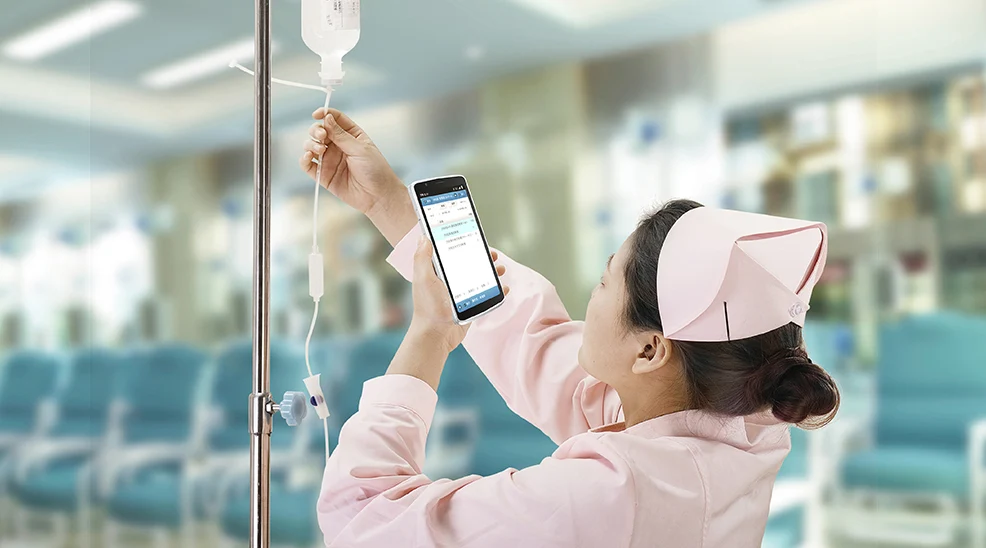
Bedside Nursing Care: Nurses use medical tablets at the patient's bedside to scan and verify wristband and medication information, record vital signs in real-time, and directly access Electronic Medical Records (EMR) and view test results through the device. This enables "data follows the person," reduces paper records and trips to the nursing station, giving more time back to patients.
Smart Pharmacy Management: Pharmacists use handheld mobile computers with integrated high-performance scanning engines for drug receiving, inventory counting, sorting, and dispensing verification. Scanning the barcode on a medicine cabinet quickly locates drug information, greatly improving accuracy and efficiency, and ensuring medication safety.
Mobile Physician Rounds: Doctors push carts equipped with hospital-grade mobile computers into patient rooms, where they can access the patient's complete electronic file and high-definition medical images (e.g., CT, MRI) at any time, discussing the condition and making timely diagnostic decisions face-to-face with the patient and family.
In-House Logistics and Asset Management: Logistics staff use rugged mobile devices to scan asset tags on medical equipment and consumable kits, enabling real-time location tracking, scheduled inspections, and maintenance record management, optimizing asset utilization.
5. Case Study: Application of SEUIC Mobile Computers in Healthcare
Case Study: Application of the Mobile Computer at Beijing 301 Hospital in Nursing Work
Background Introduction
Beijing 301 Hospital, founded in 1953, is a large comprehensive medical facility integrating healthcare, education, and research, renowned for its advanced technology and scale. The hospital is committed to improving nursing efficiency and quality, but bottlenecks in the original nursing processes prompted its digital upgrade.
This project aimed to extend nursing work to the patient bedside and achieve real-time data management by introducing mobile computing technology.
Challenges
- Inability to Access Patient Information in Real Time: Nursing staff could not obtain patient data instantly in the wards, leading to information delays.
- Frequent Trips Between Nursing Station and Wards: Increased time consumption and physical burden, affecting efficiency.
- Unsynchronized Order Information: Doctor's order execution lacked real-time synchronization, leading to potential errors or omissions.
- Error-Prone Manual Recording: Retrospective writing and manual transcription processes had high error rates, compromising data accuracy.
- Insufficient Data Timeliness: Key information like vital signs was not collected promptly, affecting nursing decisions.
These challenges directly impacted the "Three Checks and Seven Verifications" principle of nursing work (Three Checks: check before, during, and after operation; Seven Verifications: verify patient, bed number, drug, dosage, concentration, time, and route), necessitating technological intervention.
Solution
Beijing 301 Hospital extended nursing responsibilities to the wards by building a mobile nursing system utilizing wireless networks and CRUISE2 5G-HC mobile computers. Specific measures included:
- Deploying Mobile Handheld Terminals: Nursing staff used secure mobile devices to view the Nursing Information System in real-time, browsing patient data such as blood pressure, temperature, pulse, and intake/output information.
- Real-Time Verification of Orders: When executing doctor's orders, the system automatically verified the latest modifications, ensuring the real-time implementation of the "Three Checks and Seven Verifications" principle and reducing human error.
- Electronic Recording and Verification: The system automatically recorded patient status and treatment information, and verified patient identity and order execution, enhancing process control.
This solution strengthened the automation and integration of the nursing process, with a particular focus on the order execution and confirmation stages.
Results
- Strengthened Process Control: The mobile system enabled real-time monitoring of nursing work, significantly improving the accuracy and efficiency of order execution.
- Real-Time Data: Patient information like vital signs could be collected in real-time at the bedside, improving data timeliness and reliability.
- Reduced Error Rate: Automated verification significantly reduced manual errors, ensuring nursing quality.
- Improved Work Efficiency: Reduced the travel time for nursing staff, allowing them to focus on higher-value tasks and optimizing human resource allocation.
This case demonstrates the successful application of mobile technology in medical care, providing a template for digital transformation for similar medical institutions.
Choosing the best medical mobile computer is essentially about selecting the most reliable and efficient digital partner for healthcare staff. It should not be a weak link in the workflow but a solid cornerstone for improving the quality of care, ensuring patient safety, and enhancing operational efficiency.
Investing in professional equipment truly designed for the healthcare environment, while potentially having a higher initial cost, delivers long-term value in durability, security, manageability, and workflow adaptability. This translates into lower failure rates, higher employee satisfaction, and better quality healthcare output.
- Demystifying Manual Traceability Pains: How CRUISE2 5G Enables Barcode-Based Bidirectional Traceability2026-04-03
- Demystifying Slow Backroom Transfers: How UTouch 2-S Enables Second-Level Inventory Navigation2026-04-03
- Demystifying Quality Control Bottlenecks: How RFID Moves Towards Proactive Prevention2026-04-02
- How Handheld Computers Achieve End-to-End Traceability2026-04-02
- Demystifying Workstation Information Bottlenecks: How CRUISE2 5G Enables Paperless, Real-Time Operations2026-04-01