Brief Introduction
Mobile computers have become core tools for modern enterprise digital transformation, significantly streamlining business processes through real-time data processing and efficient information management. How to use mobile computers effectively? To fully leverage the performance of these devices, it's essential to understand not only basic operations but also systematic usage strategies and maintenance methods. This article provides a complete guide from device selection to advanced applications.
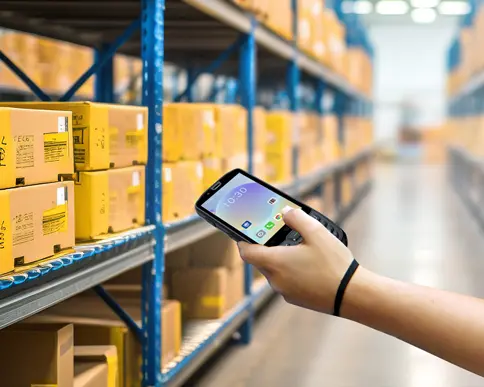
In-depth Analysis of Mobile Computers' Core Value
Before delving into detailed usage guidelines, we first need to fully understand the strategic value of mobile computers in modern business environments. These devices have evolved from simple data collection tools to intelligent terminals for enterprise operations, with value reflected in three key dimensions:
Operational Efficiency Improvement:Automated data collection reduces manual input errors, increasing data entry efficiency by 300-500%. Real-time data processing capability shortens decision cycles from hours to minutes.
Cost Control Optimization:Reduces paper document usage, lowering printing and storage costs. Preventive maintenance reduces equipment failure rates, cutting repair costs by 40%.
Data-Driven Decision Making:Collected operational data provides quantitative basis for business process optimization. Real-time analysis helps identify efficiency bottlenecks and improvement opportunities.
1. Comprehensive Mastery of Device Functions: From Basic Operations to Advanced Applications
1.1 In-depth Mastery of Basic Device Functions
Modern mobile computers integrate various advanced technologies, and comprehensive understanding of each function is the foundation for efficient use. We recommend following these steps for systematic learning:
Power On/Off and Power Management:Not only know how to turn devices on/off, but also master power optimization settings. For example, set auto shutdown time, backlight brightness adjustment, CPU performance mode selection, etc. Proper power management can extend battery life by 20-30%.
Personalized Interface Settings:Customize home screen layout according to usage habits, place frequently used functions in convenient locations. Learn gesture operations and shortcuts to reduce operational steps. Research shows reasonable interface customization can improve operational efficiency by 15%.
Data Input Optimization Techniques:Master multiple data entry methods including virtual keyboard input switching, voice input, scanning input, etc. Choose the optimal input method for different scenarios, such as prioritizing scanning input during inventory counting.
1.2 Professional Application of Scanning Functions
Scanning function is the core value of mobile computers and requires professional settings based on different application scenarios:
Barcode Type Recognition Optimization:Adjust scanning parameters for different code types including 1D barcodes, QR codes, Data Matrix, etc. In logistics industry, 1D barcode recognition success rate should reach 99.9%, QR code recognition speed should be less than 0.3 seconds.
Challenging Environment Scanning Strategies:Adjust scanning angles and distances for challenging environments like reflective surfaces, curved surfaces, low contrast, etc. Use fill light function to improve recognition in low-light conditions.
Batch Scanning Efficiency Improvement:Set continuous scanning mode, optimize scanning interval time. In warehouse counting scenarios, skilled operators can scan 60-80 items per minute, 5 times more efficient than manual recording.
1.3 Full Utilization of Sensor Functions
Modern mobile computers integrate various sensors, and fully leveraging their functions can enhance application value:
GPS Positioning Applications:In field personnel management, GPS data can optimize route planning, reduce ineffective travel. Combined with geofencing technology, automatically record arrival and departure times from specific areas.
Environmental Sensor Usage:Temperature and humidity sensors can monitor storage environments, ensure commodity preservation conditions. Light sensors automatically adjust screen brightness, improve reading comfort.
NFC Near Field Communication:Enable quick device pairing, employee authentication, fast information exchange. In retail scenarios, NFC can be used for mobile payments and member recognition.
2. Professional Equipment Maintenance: Ensuring Long-term Stable Operation
2.1 Standardized Daily Cleaning Procedures
Establishing scientific cleaning and maintenance procedures can significantly extend equipment service life. We recommend establishing the following standardized operations:
Professional Screen Cleaning Methods:Use microfiber cloth and specialized cleaners, avoid alcohol-based solvents that damage anti-glare coatings. Clean at the end of each workday to ensure clear screens for next day use.
Scanning Window Maintenance:Keep scanning windows clean and scratch-free, regularly check protective film wear. In dusty environments, clean scanning windows every 4 hours to ensure recognition rates don't decline.
Body Interface Protection:Prevent dust and liquid from entering interfaces, use protective caps for unused interfaces. Regularly check if interface pins are deformed or oxidized.
2.2 Software System Maintenance Strategies
Software system stability directly affects device usage effectiveness and requires systematic maintenance mechanisms:
Regular Update Management:Establish firmware and software update schedules, check for updates monthly. Verify compatibility on test devices before major version updates. Statistics show regular updates can reduce system failures by 40%.
Data Backup Mechanisms:Set automatic backup strategies, backup important data daily. Use dual protection with cloud and local backups to ensure data security.
Performance Monitoring and Alerts:Install device monitoring software, real-time monitoring of CPU, memory, storage space usage. Set threshold alerts to identify potential issues in advance.
2.3 Preventive Maintenance Plans
Develop scientific preventive maintenance plans to eliminate failures in the bud:
Monthly Inspection Items:Check battery health, key sensitivity, scanning performance. Use professional tools to detect various device parameters, generate health reports.
Quarterly Deep Maintenance:Perform firmware optimization, storage organization, system cleaning. Check device physical condition including case wear, interface looseness, etc.
Annual Comprehensive Testing:Send to professional institutions for comprehensive testing and calibration. Decide whether to replace aging components based on test results.
3. Comprehensive Data Security Protection: Multi-layer Protection from Device to Cloud
3.1 Device-level Security Protection
Mobile devices store enterprise critical data and require comprehensive security protection systems:
Enhanced Identity Authentication:Use multi-factor authentication mechanisms including passwords, patterns, fingerprints, facial recognition, etc. Set authentication methods based on different security level requirements, high-security scenarios require authentication every time device is awakened.
Comprehensive Data Encryption Implementation:Full disk encryption for stored data, TLS encryption for transmitted data. Set automatic encryption policies to ensure all sensitive information is protected.
Remote Management Capabilities:Deploy mobile device management (MDM) systems, achieve remote locking, data wiping, application management. When devices are lost, sensitive data can be remotely wiped.
3.2 Network Security Protection Strategies
Mobile devices are often used in different network environments and require special network security measures:
Wi-Fi Security Configuration:Disable automatic connection to open networks, set trusted network whitelist. Use WPA3 encryption protocol, regularly change network passwords.
VPN Secure Access:When accessing internal systems from external networks, force VPN connections. Set two-factor authentication to ensure access security.
Data Transmission Protection:End-to-end encryption for sensitive data transmission. Set transmission timeout mechanisms to avoid data exposure on networks for extended periods.
3.3 Application Security Management System
Applications are important links in data security and require strict management systems:
Application Permission Management:Follow principle of least privilege, applications can only obtain necessary permissions. Regularly review application permission settings, revoke unnecessary permissions.
Application Whitelist Mechanism:Only allow installation of reviewed applications. Establish app stores providing security-tested applications.
Security Audit Logs:Record all sensitive operations including data access, application installation, setting modifications, etc. Regularly analyze logs to detect abnormal behaviors.
4. Industry-specific Professional Applications: Maximizing Business Value
4.1 Manufacturing Industry Professional Solutions
In manufacturing environments, mobile computer applications need optimization for specific scenarios:
Production Quality Management:Use mobile devices to real-time record production data and quality inspection results. Track raw material batches and production parameters through barcodes or RFID, achieve full-process quality traceability.
Equipment Maintenance Management:Scan equipment QR codes to access maintenance manuals and repair records. Real-time record equipment operation status, warn of potential failures. Statistics show such preventive maintenance can reduce equipment downtime by 30%.
Warehouse Material Management:Achieve real-time inventory updates, automatically generate replenishment alerts. Improve counting efficiency through mobile scanning, reduce monthly counting time from 8 hours to 2 hours.
4.2 Retail Industry Optimization Applications
Retail industry has special application requirements for mobile computers requiring targeted optimization:
Inventory Management Innovation:Employees use mobile devices for real-time inventory queries and updates. Automatically generate replenishment orders for out-of-stock items, timely alerts for slow-moving items. Practice proves this model can reduce stockouts by 50%.
Customer Service Enhancement:Sales staff use mobile devices to query product information, inventory status, customer history. Support mobile payments, reduce customer queue time, improve shopping experience.
Promotion Management Optimization:Real-time update promotional prices and information, ensure price consistency. Automatically display promotion information when scanning products, reduce pricing errors.
4.3 Logistics Industry Professional Applications
Logistics industry is a key application field for mobile computers requiring professional solutions:
Express Delivery Management:Couriers use mobile devices to scan waybills, real-time update logistics status. Electronic signature confirmation for receipts, reduce paper document usage. Daily package processing per courier increases by 40%.
Route Optimization and Dispatch:Combine GPS data to optimize delivery routes, reduce ineffective mileage. Real-time monitor delivery progress, timely adjust dispatch plans. Average delivery time shortens by 25%.
Warehouse Operation Efficiency:Use handheld devices for receiving, putaway, picking, counting operations. Scanning accuracy increases to 99.9%, operational efficiency improves by 35%.
5. Continuous Learning and Skill Improvement: Adapting to Technological Development
5.1 Establishing Systematic Training Systems
With continuous technological development, establishing ongoing learning mechanisms is essential to ensure skills don't become outdated:
New Employee Training Plans:Develop standardized onboarding training courses including device operation, software usage, safety regulations, etc. Training period 3-5 days, ensure proficient operation. Only allow上岗 after passing assessment.
Regular Skill Enhancement:Organize quarterly skill enhancement training, introduce new functions and techniques. Invite manufacturer engineers for professional guidance, solve difficult usage problems.
Cross-departmental Experience Sharing:Regularly organize experience exchange meetings among different departments, share best practices. Establish internal expert database, provide technical support and guidance.
5.2 Technology Update Tracking Mechanisms
Mobile computer technology updates rapidly, requiring effective tracking and learning mechanisms:
Industry Trend Monitoring:Subscribe to industry media and technical forums, timely understand latest technological developments. Attend industry exhibitions and seminars, exchange usage experiences with peers.
Supplier Technical Exchange:Establish regular technical exchange mechanisms with equipment suppliers, obtain latest technical information. Participate in Beta testing programs, experience new functions in advance.
Internal Knowledge Management:Establish internal knowledge base, collect usage techniques and problem solutions. Encourage employees to share usage experiences, form knowledge accumulation.
5.3 Skill Certification and Incentives
Establish scientific skill evaluation systems to encourage continuous employee improvement:
Skill Level Certification:Set basic, intermediate, advanced three-level skill certification, clarify ability requirements for each level. Regularly organize certification exams, grant corresponding qualifications after passing.
Performance Incentive Measures:Include device usage efficiency in performance evaluation indicators. Reward employees proposing effective improvement suggestions, create innovation atmosphere.
Career Development Paths:Provide career development opportunities for technically proficient employees, such as equipment management, trainer positions. Establish clear technical promotion paths.
SEUIC Technologies: Professional Mobile Computing Solutions Provider
Founded in 2002, SEUIC Technologies Co., Ltd. has always been committed to innovation and development of mobile computing technology. The company masters core technologies of key products including mobile computers, RFID readers, tablets, barcode scanners, and fixed readers, continuously enhancing technological innovation capabilities.
Product Technological Advantages:
Industrial-grade Reliability:All products pass strict industrial standard testing, protection rating above IP65, adaptable to various harsh working environments. Mean time between failures exceeds 10,000 hours.
Advanced Technology Integration:Pioneer application of advanced technologies like AI scanning, 5G communication, BeiDou positioning in the industry. Scanning recognition speed reaches 0.1 seconds, recognition accuracy exceeds 99.9%.
Personalized Customization Services:Provide hardware and software customization services based on special customer requirements. Support interface expansion, functional module addition, appearance customization, etc., meeting special application scenario needs.
Industry Solutions:
Manufacturing Solutions:Provide complete solutions from production line data collection to quality traceability. Help customers achieve production transparency, quality traceability, efficiency quantification.
Logistics Industry Solutions:Create logistics digitalization system featuring smart warehousing, intelligent distribution, full-process traceability. Improve operational efficiency, reduce operating costs, enhance service quality.
Retail Industry Applications:Provide integrated solutions for mobile POS, inventory management, customer service. Support omnichannel retail, enhance consumer experience.
Service Support System:
Professional Technical Support:Establish 7×24 technical support hotline, respond to customer issues within 30 minutes. Set up multiple maintenance centers nationwide, provide quick repair services.
Training Certification Services:Provide three-level training certification for operators, administrators, developers. Regularly organize technical training sessions, share industry best practices.
Continuous Product Upgrades:Establish product lifecycle management system, timely release software updates and feature enhancements. Ensure customers always use the most advanced technology.
Through continuous technological innovation and comprehensive service systems, SEUIC Technologies provides reliable mobile computing solutions for customers across various industries, assisting enterprise digital transformation, enhancing operational efficiency and competitiveness.
- Demystifying Manual Traceability Pains: How CRUISE2 5G Enables Barcode-Based Bidirectional Traceability2026-04-03
- Demystifying Slow Backroom Transfers: How UTouch 2-S Enables Second-Level Inventory Navigation2026-04-03
- Demystifying Quality Control Bottlenecks: How RFID Moves Towards Proactive Prevention2026-04-02
- How Handheld Computers Achieve End-to-End Traceability2026-04-02
- Demystifying Workstation Information Bottlenecks: How CRUISE2 5G Enables Paperless, Real-Time Operations2026-04-01