Brief Introduction
Are you facing a tricky budget decision: purchasing new inventory management equipment for your warehouse, store, or field team? The market offers both familiar industrial-grade "handheld mobile computers" and more modern, feature-rich "tablets." Choosing between them often involves difficult trade-offs between initial cost, long-term efficiency, durability, and employee acceptance. Choosing wrong can lead to inefficient scanning, frequent equipment damage, employee complaints about awkward tools, and even impact overall supply chain visibility. This article will clear the confusion. We will impartially compare handheld computers and tablets and provide a clear decision framework to help you select the ultimate tool best suited to your inventory management needs based on specific business scenarios, workflows, and budget.
1. Basic Concept Clarification: What is a Handheld Mobile Computer? What is an Industrial Tablet?
Before diving into comparisons, we must establish a common baseline. We are not discussing ordinary consumer-grade devices.
1.1 Handheld Mobile Computer (Handheld/PDA/Data Terminal)
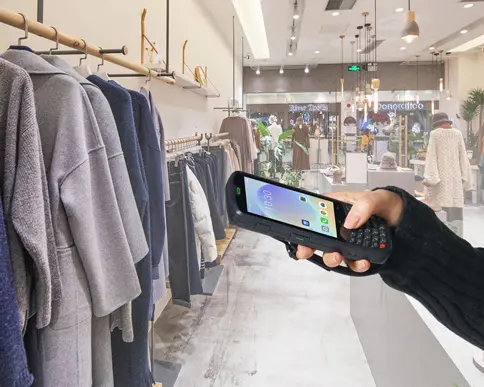
This is a professional tool born for single or core tasks, most commonly mobile data capture. It typically integrates a high-performance barcode scanning engine, physical keyboard, rugged housing, and runs an OS optimized for mobile work. Its design philosophy: enable users to complete the core "scan-input-confirm" loop fastest and most reliably in the harshest environments.
1.2 Industrial/Rugged Tablet
This is a more versatile computer with a larger touchscreen, offering richer visual interaction and data processing capabilities. It also has rugged features and can achieve barcode scanning via external scanner handles or built-in cameras. Its core advantage lies in information display, complex form filling, video guidance, and remote collaboration.
2. Core Comparison Dimensions: Comprehensive Showdown Between Handhelds and Tablets
We compare systematically across six key dimensions that directly determine the Total Cost of Ownership and Return on Investment.
| Comparison Dimension | Handheld Mobile Computer | Industrial/Rugged Tablet | Core Impact |
| Hardware Design & Ergonomics | Designed for one-handed operation, compact and lightweight. Physical scan keys and keyboard support "blind operation," boosting efficiency. | Requires two-handed use or a stand, heavier. Relies mainly on touchscreen, inconvenient with gloves or in wet conditions. | Employee fatigue, operation speed, task adaptability. |
| Industrial Durability & TCO | Born rugged: Typically meets IP65-IP68 and MIL-STD-810G for drops. Highly integrated body. | Ruggedized: Achieves similar ratings via cases/structural reinforcement. Larger screen has higher breakage risk. | Device lifespan, maintenance frequency, unexpected downtime cost. Handhelds often have lower long-term maintenance costs. |
| Scanning Performance & Efficiency | Core advantage: Integrated professional scan engine. Strong long-range, high-density, damaged barcode reading. Supports continuous rapid scanning. | Add-on feature: Relies on camera or external handle. Camera scanning poor in low light, long range, or on fast conveyors. External handle adds cost and failure point. | Ceiling of operational efficiency. Handhelds far more efficient in high-intensity scanning. |
| Software & Compatibility | Runs streamlined, stable Android/Windows. High integration with WMS, ERP. Mature drivers. | Runs standard Android/Windows. Rich app ecosystem, easy complex GUI app development, video calls. Flexible integration with new SaaS platforms. | System integration difficulty, custom development cost, feature scalability. |
| Battery Life & Manageability | Hot-swappable battery supports 24/7 shift work. Strict remote control via professional MDM. | Built-in battery,Battery Life affected by large screen, often needs mid-shift charging. MDM strong, but consumer features may pose security distractions. | Work continuity, IT management efficiency, data security. |
| Initial Purchase Cost | Typically higher due to integrated professional scan engine and rugged design. | Base rugged tablet cost may be lower, but adding professional scan handle can make total cost comparable or higher. | Starting point for budget decision, but requires comprehensive TCO assessment. |
Discussing advantages and disadvantages without context is empty talk. Let's match equipment based on your business type.
Scenario 1: High-Intensity Warehouse and Logistics Centers
Typical Tasks: Receiving/putaway, order picking (especially pallet/case level), cycle counting, loading verification.
Recommended Device: Handheld Mobile Computer.
Reason: Speed is money. One-handed operation, professional scan engine's millisecond-level recognition speed, and all-day battery life are the foundation for warehouse throughput. Tablets are cumbersome and inefficient here.
Scenario 2: Retail Store and Supermarket Management
Typical Tasks: Shelf inventory, price verification, stock inquiry, simple receiving.
Recommended Equipment: Requires Further Segmentation.
Pure High-Frequency Counting: Handheld computer is more efficient.
Multifunctional Needs: Rugged tablet may be more suitable due to larger screen for displaying product details/training.
Reason: Balance professional efficiency and multifunctionality.
Scenario 3: Field Inspection and Asset Tracking
Typical Tasks: Meter reading, equipment inspection, fixed asset inventory, field data collection.
Recommended Device: Handheld Mobile Computer OR Rugged Tablet with handle.
Reason: Outdoor environments are complex. If primarily scanning barcodes/RFID, handheld is preferred. If needing photos, complex forms, large drawings, a tablet with handle is better.
4. Your Decision Framework and Final Selection Guide
Answer these questions sequentially; the answers will clearly point to your ideal device:
Step 1: Define Core Tasks
Q1: Do your employees spend 80% of their time rapidly scanning barcodes, or reading information, filling complex forms, collaborating?
Mostly scanning -> Strongly Recommended handheld computer.
Mostly interactive viewing -> Consider rugged tablet.
Step 2: Assess Operating Environment
Q2: Will the device be used in dusty, wet, or frequent drop environments?
Yes -> Handheld's rugged, integrated design carries lower risk.
Relatively gentle -> Both possible, but tablet's large screen remains a vulnerability.
Step 3: Calculate Total Cost of Ownership (TCO)
Don't just look at purchase price. Factor in the cost of a professional scan handle, heavy-duty case, spare battery for the tablet. What is the expected failure rate and downtime cost over 3 years? Handhelds' integrated design often results in lower TCO.
Step 4: Consider Employees and IT
Q3: Can your IT department manage devices via MDM and restrict non-work apps?
Q4: Do your employees prefer efficiency-focused physical keys or smartphone-like touchscreens?
In the "handheld computer vs tablet" debate, there is no single winner, only the best fit for the scenario. Handheld computers are the "special forces" of inventory management, irreplaceable in battlefields requiring ultimate efficiency, reliability, and durability. Rugged tablets are "all-rounders," excelling in scenarios requiring rich interaction, visual presentation, and multi-functional integration.
- Demystifying Manual Traceability Pains: How CRUISE2 5G Enables Barcode-Based Bidirectional Traceability2026-04-03
- Demystifying Slow Backroom Transfers: How UTouch 2-S Enables Second-Level Inventory Navigation2026-04-03
- Demystifying Quality Control Bottlenecks: How RFID Moves Towards Proactive Prevention2026-04-02
- How Handheld Computers Achieve End-to-End Traceability2026-04-02
- Demystifying Workstation Information Bottlenecks: How CRUISE2 5G Enables Paperless, Real-Time Operations2026-04-01